Multisig Setup Guide
In this guide, you will:
- Set up 3 hardware wallets for multisig
- Create a 2-of-3 multisig wallet in Sparrow
- Properly back up seed phrases and wallet descriptor
- Test your recovery procedure
⏱️ Time required: 2-3 hours
📊 Difficulty: Intermediate to Advanced
💰 Estimated cost: $200-450 (3 hardware wallets) + $30-60 (metal seed backups)
🔧 Prerequisites: 3 hardware wallets, Sparrow Wallet installed, understanding of multisig concepts
If you're new to multisig, read Multisig Wallets Explained first to understand what you're building and why.
This guide walks you through setting up a 2-of-3 multisig wallet—the most popular configuration for individual self-custody. You'll need any 2 of your 3 keys to spend, providing both theft protection and loss protection.
What You're Building
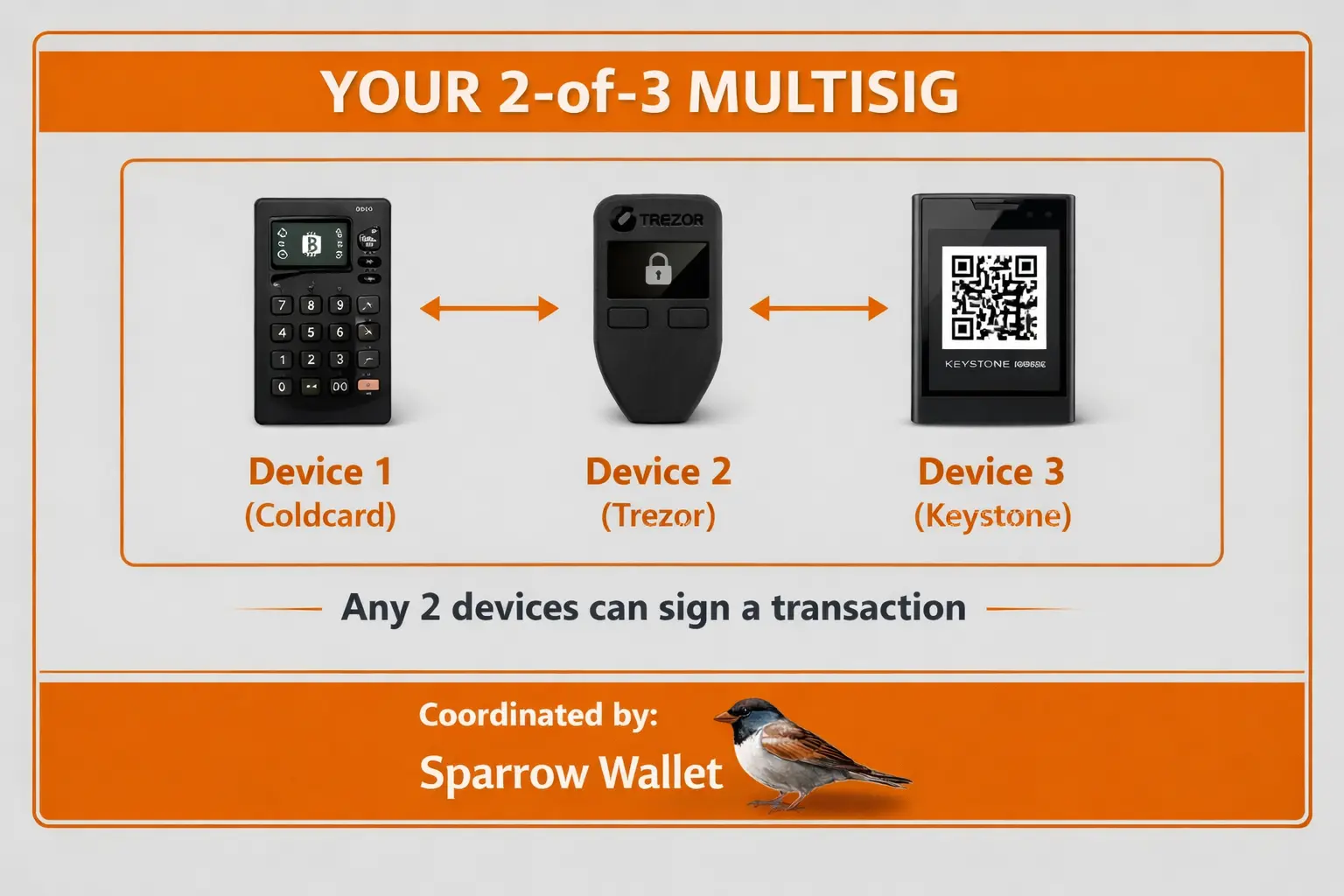
| If This Happens | Result |
|---|---|
| One device stolen | Funds safe (thief needs 2 devices) |
| One seed phrase lost | Funds safe (2 remaining devices work) |
| House fire destroys one location | Funds safe (other locations have keys) |
Quick Recap: Multisig Essentials
Before starting, make sure you understand these critical points:
| Concept | What It Means |
|---|---|
| 2-of-3 | Need 2 of 3 keys to spend |
| Wallet descriptor | Configuration file—must be backed up alongside seeds |
| PSBT | Partially Signed Bitcoin Transaction—how multisig transactions are created and signed |
| Different manufacturers | Use hardware wallets from different brands to avoid single-vendor risk |
You must back up the wallet descriptor, not just the seed phrases. Without the descriptor, you cannot reconstruct your wallet even with all 3 seeds.
Understanding the Components
1. Hardware Wallets (Signing Devices)
Each key in your multisig lives on a separate hardware wallet. These devices:
- Generate and store private keys securely
- Sign transactions without exposing keys
- Verify addresses on their own screens
Recommended devices for multisig:
| Device | Pros | Cons |
|---|---|---|
| Coldcard | Air-gapped, Bitcoin-only, excellent multisig support | Steeper learning curve |
| Trezor | User-friendly, open-source, great Sparrow integration | No secure element |
| Keystone | Air-gapped, QR codes, good mobile support | Newer company |
| BitBox02 | Simple, secure element, Swiss quality | Limited screen size |
| Ledger | Wide compatibility, secure element | Closed source firmware |
Use devices from different manufacturers. If a vulnerability is found in one brand, your other keys remain secure.
2. Coordinator Software
Coordinator software manages your multisig wallet:
- Creates the multisig configuration
- Generates receive addresses
- Creates unsigned transactions (PSBTs)
- Combines signatures from multiple devices
Recommended coordinators:
| Software | Best For | Platform |
|---|---|---|
| Sparrow Wallet | Power users, privacy | Desktop |
| Nunchuk | Beginners, mobile | Desktop + Mobile |
| Specter Desktop | Node integration | Desktop |
| Electrum | Technical users | Desktop |
3. The Wallet Descriptor (Configuration File)
The wallet descriptor (also called output descriptor) is critical. It contains:
- All public keys (xpubs) for the multisig
- The script type (Native SegWit recommended)
- The M-of-N policy
Example descriptor (simplified):
wsh(sortedmulti(2,
  [fingerprint1/48'/0'/0'/2']xpub1...,
  [fingerprint2/48'/0'/0'/2']xpub2...,
  [fingerprint3/48'/0'/0'/2']xpub3...
))
You MUST back up your wallet descriptor! Without it, you cannot reconstruct your multisig wallet, even with all seed phrases.
What You Need to Back Up
Multisig backups are more complex than single-sig. Here's what you need:
For a 2-of-3 Multisig
| Item | Quantity | Purpose |
|---|---|---|
| Seed phrases | 3 | Recover individual keys |
| Wallet descriptor | 1 | Reconstruct the multisig structure |
| Hardware wallets | 3 | Hold the keys for signing |
Backup Requirements by Scenario
To SPEND bitcoin (normal operation):
- 2 hardware wallets with their PINs
- Coordinator software with wallet loaded
To RECOVER if you lose 1 key:
- 2 remaining seed phrases
- Wallet descriptor
To FULLY RECOVER from scratch:
- 2 seed phrases (minimum for 2-of-3)
- Wallet descriptor (containing all 3 xpubs)
Backup Storage Strategy
Store each item in a different secure location:
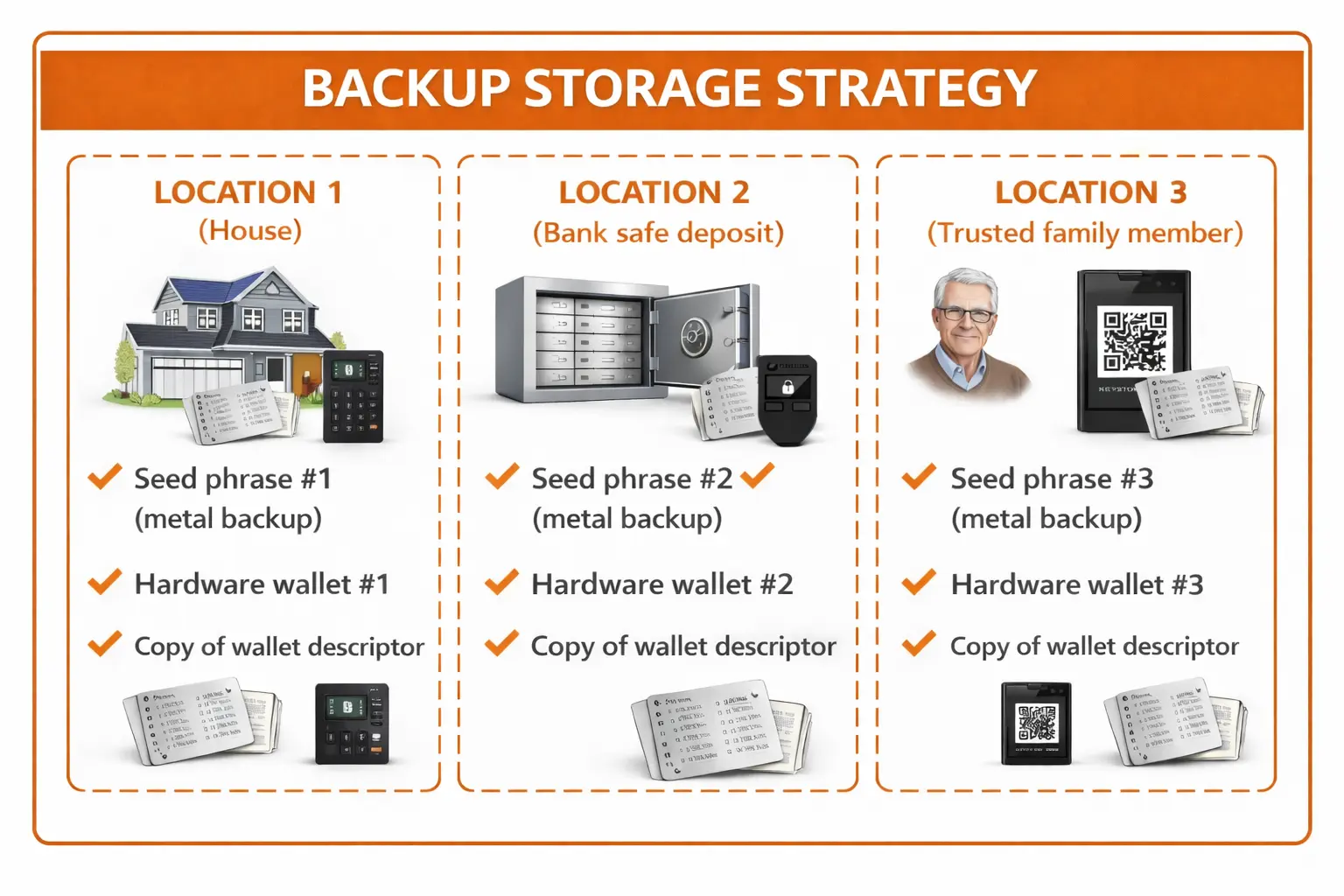
Never store:
- Multiple seed phrases in the same location
- A seed phrase with its corresponding hardware wallet
Choosing Your Configuration
2-of-3: The Sweet Spot
For most individuals, 2-of-3 multisig offers the best balance:
Advantages:
- Lose 1 key → Still have access (fault tolerance)
- 1 key stolen → Funds still safe (theft protection)
- Manageable complexity (3 backups, 3 devices)
- Lower transaction fees than 3-of-5
What you secure:
- 3 hardware wallets
- 3 seed phrase backups
- 1 wallet descriptor (with 3 copies)
3-of-5: Maximum Security
For very large holdings or organizations:
Advantages:
- Can lose 2 keys and still access funds
- 2 keys can be stolen without fund loss
- Good for distributed teams/families
Disadvantages:
- 5 devices to purchase and manage
- 5 seed phrases to secure (10 locations if you separate!)
- Higher transaction fees
- More coordination for signing
2-of-2: Shared Control (Use Carefully)
⚠️ Not recommended for most users
- No redundancy — lose 1 key, lose everything
- Both parties must be available to spend
- Use only for specific shared-custody scenarios
Collaborative Custody Services
Don't want to manage all keys yourself? Collaborative custody providers hold one key while you hold the majority.
How It Works
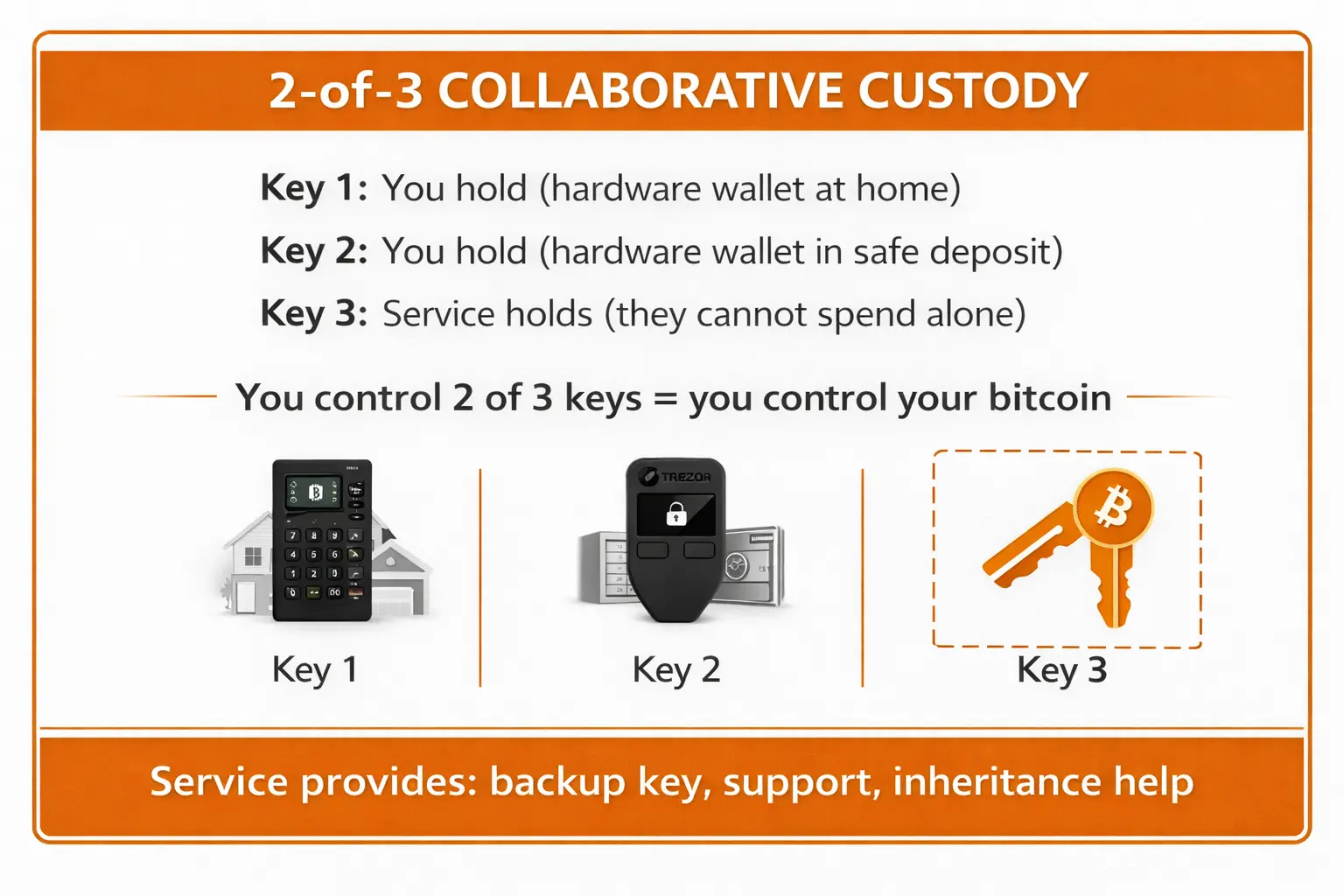
Providers Comparison
| Service | Free Tier | Paid Plans | Best For |
|---|---|---|---|
| Unchained | Yes (2-of-3) | From $0 + per-sign fee | Financial services, loans |
| Casa | Basic wallet | From $30/month | Beginners, inheritance |
| Nunchuk | Yes | From $15/month | Privacy, flexibility |
Pros and Cons
Advantages:
- Professional support and guidance
- Inheritance solutions included
- Recovery help if you lose a key
- Less burden managing all backups
Disadvantages:
- Monthly fees (some services)
- Must trust the provider with one key
- Less privacy (they see your xpubs)
- Company could go out of business
DIY vs. Collaborative: Which to Choose?
| Factor | DIY Multisig | Collaborative Custody |
|---|---|---|
| Technical skill needed | High | Low-Medium |
| Privacy | Maximum | Provider sees balances |
| Support available | Community only | Professional help |
| Ongoing cost | One-time (hardware) | Monthly subscription |
| Recovery assistance | You're on your own | Help available |
| Best for | Technical users | Beginners, busy people |
My recommendation:
- New to multisig? Start with collaborative custody to learn the concepts
- Technical and privacy-focused? DIY with Sparrow Wallet
- Significant holdings but not technical? Collaborative custody is worth the cost
Common Multisig Mistakes
Mistake 1: Not Backing Up the Wallet Descriptor
Problem: You have all 3 seed phrases but can't reconstruct the wallet.
Solution: Store the wallet descriptor (as PDF, file, or printed) with each seed phrase backup.
Mistake 2: Storing Multiple Seeds Together
Problem: A single theft or disaster compromises multiple keys.
Solution: Geographic distribution — each seed in a different location.
Mistake 3: Using the Same Hardware Wallet Brand
Problem: A firmware vulnerability affects all your signing devices.
Solution: Mix manufacturers (e.g., Coldcard + Trezor + Keystone).
Mistake 4: Not Testing Recovery
Problem: You think your backup works but haven't verified it.
Solution: Practice recovery with a small amount before depositing significant funds.
Mistake 5: Overcomplicating the Setup
Problem: 5-of-7 multisig across 3 continents with time locks...
Solution: Start simple. 2-of-3 is sufficient for most individuals.
Mistake 6: Not Verifying Addresses on Devices
Problem: Malware could show you a fake address on your computer.
Solution: Always verify receive addresses on your hardware wallet screens before depositing.
Security Checklist
Before depositing significant funds, verify:
- Each hardware wallet is from a different manufacturer (recommended)
- Each seed phrase is backed up on metal (fire/water resistant)
- Seed phrases are stored in separate physical locations
- Wallet descriptor is backed up (multiple copies in different locations)
- You've verified a receive address matches on at least 2 hardware wallets
- You've successfully completed a test transaction (send and receive)
- You've practiced full wallet recovery from backups
- You understand you need M keys to spend (not just one)
- Hardware wallets are registered with the multisig configuration
Summary
Multisig removes the single point of failure that makes single-signature wallets vulnerable. With a proper 2-of-3 setup:
- One key lost? You can still access your bitcoin
- One key stolen? The thief can't take your funds
- House fire? Your other keys are in different locations
The tradeoff: More complexity, more items to back up, more coordination to spend.
Is it worth it? For significant holdings you plan to store long-term — absolutely.
Next Steps
Ready to set up your multisig?
- Hardware Setup — Prepare your signing devices
- Sparrow Setup — Create your 2-of-3 multisig wallet
- Backup & Recovery — Secure your wallet properly
Related Guides
- Understanding Private Keys — Foundation for key management
- Seed Phrases — How seed phrases work
- Hardware Wallets — Signing device basics
- UTXO Management — Managing coins in your wallet
- Bitcoin Node — Connect your multisig to your own node