Multisig Backup & Recovery
Proper backup is critical for multisig. The complexity that provides security can also lead to permanent loss if backups aren't done correctly.
What You Must Back Up
For a 2-of-3 multisig, you need to secure:
| Item | Copies | Purpose |
|---|---|---|
| Seed Phrase #1 | 1 | Recover Key 1 |
| Seed Phrase #2 | 1 | Recover Key 2 |
| Seed Phrase #3 | 1 | Recover Key 3 |
| Wallet Descriptor | 3+ | Reconstruct multisig structure |
| Device PINs | 3 | Access hardware wallets |
The wallet descriptor is as important as your seed phrases!
Without it, having all three seeds won't help you — you won't know how to combine them into the multisig.
Understanding the Wallet Descriptor
The wallet descriptor contains:
Example (simplified):
wsh(sortedmulti(2,
  [73c5da0a/48h/0h/0h/2h]xpub6...ABC,
  [8f3a2b1c/48h/0h/0h/2h]xpub6...DEF,
  [a2c4e6f8/48h/0h/0h/2h]xpub6...GHI
))#checksum
This tells wallet software:
- wsh — Native SegWit script type
- sortedmulti(2,...) — 2-of-3 multisig with sorted keys
- [fingerprint/path] — Which device and derivation for each key
- xpub... — The extended public key for each signer
- #checksum — Verification that descriptor is correct
From seed phrases alone, you get xpubs, but you don't know:
- Which xpubs belong together
- What the M-of-N requirement is
- The correct derivation paths
- The script type used
Backup Storage Strategy
The Cardinal Rules
- Never store multiple seed phrases together
- Never store a seed with its corresponding device
- Store wallet descriptor copies with seed backups
- Geographic separation — Different buildings, ideally different cities
Recommended 2-of-3 Storage Layout
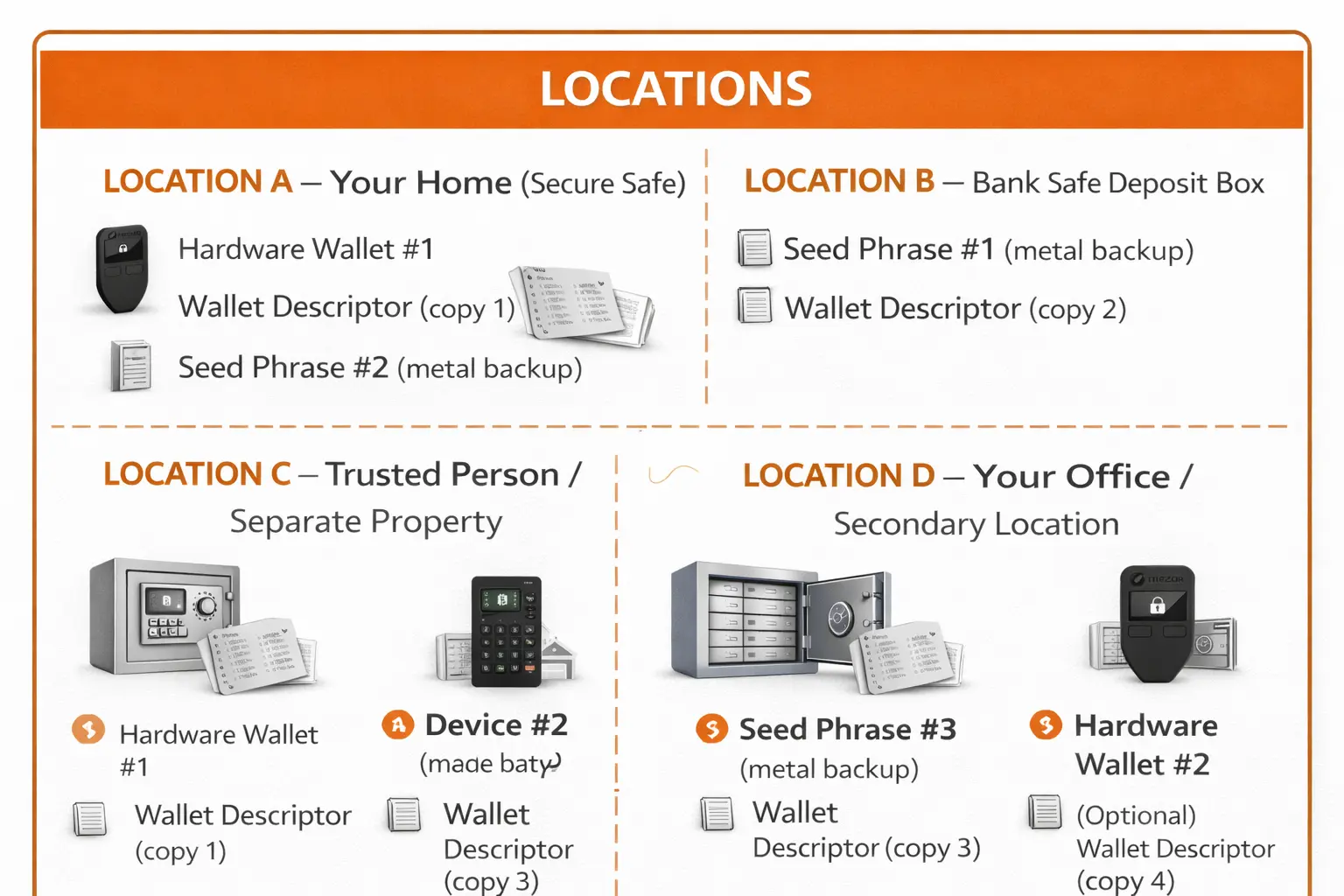
Notice:
- Each seed is in a different location
- No seed is stored with its own device
- Wallet descriptor has multiple copies
- Any two locations provide enough to recover
Creating Your Backups
Seed Phrase Backups (Metal)
Why metal:
- Survives house fires (paper burns)
- Survives flooding (paper disintegrates)
- Doesn't fade over time (ink fades)
- Resistant to physical damage
Process:
- Purchase 3 metal backup devices
- After verifying each seed works, stamp/engrave onto metal
- Double-check every word is correct
- Store in separate locations
Verification:
- Read back what you stamped
- Compare letter-by-letter with the seed
- One wrong letter = wrong seed = lost funds
Wallet Descriptor Backup
Export from Sparrow:
- Go to
Settingstab - Click QR code icon (top right)
- Click "Save PDF..."
- Print multiple copies
The PDF includes:
- QR code (scannable for recovery)
- All xpubs in text form
- Fingerprints and derivation paths
- Human-readable format
Storage:
- Print on acid-free paper
- Laminate if possible
- Store one copy with each seed backup
- Consider an encrypted digital backup (USB drive in safe)
Recovery Scenarios
Scenario 1: Lost One Hardware Wallet
Situation: Device #2 is lost or broken, but you have its seed backup.
Solution:
- Purchase new hardware wallet
- Restore seed #2 onto new device
- Re-register the multisig on the new device
- Verify addresses match the other devices
- Move funds to a fresh multisig (recommended, not required)
Why it works: You still have 3 working keys (2 devices + 1 restored).
Scenario 2: Lost One Seed Phrase
Situation: Seed backup #1 was destroyed, but Device #1 still works.
Solution:
- Device #1 still holds Key #1 — you can still sign
- Use Device #1 + one other device to move funds
- Create a NEW multisig wallet with 3 fresh seeds
- Transfer all funds to the new wallet
- Properly backup all 3 new seeds
Why immediate action: If Device #1 breaks now, you've lost Key #1 forever.
Scenario 3: One Device Stolen
Situation: Thief took Hardware Wallet #3.
Solution:
- Don't panic — Thief needs 2 keys, they only have 1
- Use Device #1 + Device #2 to move funds immediately
- Create a NEW multisig wallet with fresh seeds
- Transfer all funds to the new wallet
- The stolen device is now worthless
Time sensitivity: Move funds before thief can potentially compromise another key.
Scenario 4: Complete Recovery (Worst Case)
Situation: All three hardware wallets are destroyed. You have 2 seed backups and the wallet descriptor.
Recovery Steps:
-
Obtain new hardware wallets (2 minimum)
-
Restore seeds onto new devices:
- Device A: Restore Seed #1
- Device B: Restore Seed #2
-
Import wallet descriptor into Sparrow:
- Open Sparrow Wallet
File→New Wallet- Click the scan icon next to wallet name
- Scan the QR code from your descriptor PDF
- Or:
File→Import Wallet→ Select Sparrow format
-
Verify recovery:
- Check that addresses match what you expected
- Confirm fingerprints match your records
- Verify balance appears correctly
-
Sign a test transaction:
- Send a small amount to confirm signing works
- Use both restored devices
-
Create fresh multisig (recommended):
- Generate 3 new seeds on 3 new devices
- Create new multisig wallet
- Transfer all funds from recovered wallet
- Properly backup everything
Testing Your Recovery
Before depositing significant funds, test recovery:
Test 1: Single Device Recovery
- Wipe Device #1 to factory settings
- Restore Seed #1 onto it
- Re-register the multisig
- Verify the fingerprint matches
- Verify addresses match other devices
- Sign a small test transaction
Test 2: Full Wallet Recovery
- Delete the wallet from Sparrow
- Re-import using only the wallet descriptor
- Verify balances and addresses appear
- Connect restored devices
- Sign a transaction successfully
Test 3: Simulate Disaster
- Pretend you lost all hardware wallets
- Using only 2 seed backups + descriptor:
- Restore seeds to new/different devices
- Import descriptor into Sparrow
- Verify you can see your balance
- Sign and broadcast a transaction
If all tests pass, your backup strategy works.
Recovery Checklist
Use this checklist to verify your backup status:
Seed Phrases
- Seed #1 backed up on metal
- Seed #2 backed up on metal
- Seed #3 backed up on metal
- Each seed stored in separate location
- No seed stored with its device
- All seeds verified (restore test passed)
Wallet Descriptor
- Exported as PDF with QR code
- Printed multiple copies
- Copy stored with each seed backup
- Digital backup on encrypted USB (optional)
- Import test successful
Hardware Wallets
- All devices have unique PINs
- PINs recorded separately from seeds
- Multisig registered on all devices
- Addresses verified on all devices
- Stored in different locations from seeds
Documentation
- Fingerprint recorded for each device
- Locations documented (where is what)
- Trusted person knows where to find info (if needed)
Inheritance Considerations
Multisig adds complexity for inheritance. Your heirs need:
- Knowledge that the multisig exists
- Access to 2 of 3 seed backups
- The wallet descriptor
- Instructions on how to recover
Options:
DIY Inheritance:
- Write clear instructions
- Store with a lawyer or in a safe place
- Consider a time-locked letter service
Collaborative Custody:
- Services like Unchained, Casa, Nunchuk offer inheritance features
- They can help heirs recover funds
- Removes technical burden from family
Trusted Third Party:
- Give one key to a trusted person/lawyer
- They can assist heirs but can't steal funds alone
Common Backup Mistakes
Mistake: Storing Seeds Digitally
Problem: Screenshots, cloud storage, email = hackable
Solution: Metal backups only, never digital for seeds
Mistake: All Backups in One Location
Problem: Single fire/flood/theft destroys everything
Solution: Geographic distribution across multiple locations
Mistake: No Wallet Descriptor Backup
Problem: Can't reconstruct multisig even with all seeds
Solution: Multiple printed copies stored with seeds
Mistake: Never Testing Recovery
Problem: Discover backup doesn't work when you need it
Solution: Test recovery before depositing significant funds
Mistake: Forgetting PIN Codes
Problem: Can't access device, need to restore (delays)
Solution: Write PINs down, store separately from seeds
Summary
Multisig backup is more complex but follows clear rules:
- Separate everything — Seeds, devices, locations
- Back up the descriptor — As critical as seeds
- Test your recovery — Before you need it
- Plan for inheritance — Others may need access someday
Your backup strategy should ensure that:
- Any single loss (fire, theft, failure) doesn't compromise funds
- You can recover with 2 seeds + descriptor
- Someone you trust can help your family if needed
Related Guides
- Multisig Overview — Understanding multisig fundamentals
- Hardware Setup — Setting up signing devices
- Sparrow Setup — Creating the wallet
- Seed Phrase Backup — Metal backup options